
If you no longer wish to keep a registered domain, you can easily disable auto-renewal in your secure client area. This will prevent the domain from being renewed when it expires.
Follow these simple steps:
-
Login to Your Client Area: Access your secure client area here.
-
Navigate to Domain Settings: Select the "Domain" sub-heading after logging in. Then, click the dropdown menu on the right for the domain you wish to manage and choose "Manage Domain".
-
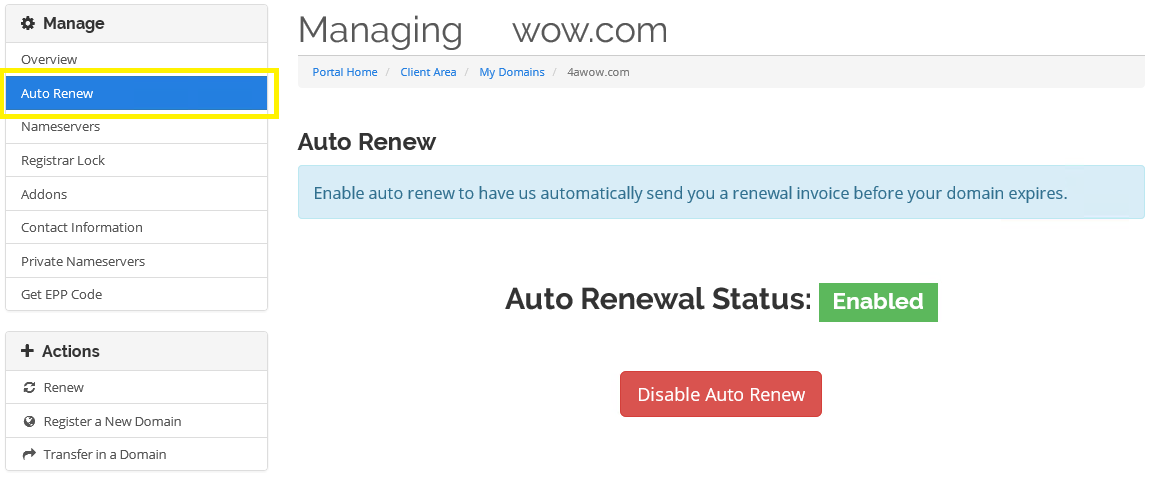
Disable Auto-Renew: In the left navigation window, click the link labeled "Auto Renew". Follow the prompts to disable auto-renewal for your domain. You can also enable or disable auto-renewal for any of your domains using these steps.
If you encounter any issues or need further assistance, please don't hesitate to reach out to our support team. We're here to help!
Optimize Your Domain Management with EpicHoster!
Take control of your domains effortlessly with EpicHoster. Visit EpicHoster.com to explore our domain management tools and enjoy seamless web hosting solutions!